
AirVid Video Filters & Frames3.0.056 - Google Play
You'll be able to see results in few seconds.
Publisher Description
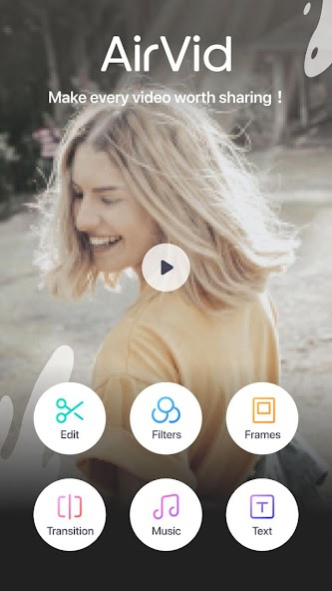


Easy yet powerful, AirVid is a free video editing tool for making videos on the go.
Customize your videos in mind-blowing ways! Insert content, cut, and adjust the speed quickly and easily. AirVid makes video editing easier than ever before with amazing tools that anyone can use, regardless of their skill level. Simply upload clips or photos to create amazing vlog entries, slideshows, or mixed videos.
Tons of awesome features!
Easy Editing:
- Adjust the speed of videos.
- Rotate or flip photos and videos.
- Cut, splice, and insert clips.
Frames:
- More than 20 limited-time free templates are ready now!
- Stylish your video by adjusting the templates, frames, background, texture, and animation.
Text:
- Personalize your video with awesome text overlays and titles.
- Sync text with video easily.
Ratios:
- Multiple sizes, colors, and templates available.
- Optimized for Instagram, Youtube, TikTok and other platforms.
Transitions:
- Using transition can make it smoother when splice different video clips.
- Different styles of transitions, you can choose according to your photos or videos.
Music:
- Tons of songs from multiple genres.
- Choose any part of a song you like for your video.
Filters:
- Dozens of filters and effects.
- Even more coming soon!
Most importantly,
AirVid is now offering these amazing features for free without ads!
Ready to Be the Vibe? Download now!
To provide feedback, please email AirVidapp@meitu.com!
Privacy Policy: https://h5.mr.meitu.com/agreement/airvid/privacy.html?lang=en
User Agreement: https://h5.mr.meitu.com/agreement/airvid/service.html?lang=en
About AirVid Video Filters & Frames
The company that develops AirVid Video Filters & Frames is PIXOCIAL TECHNOLOGY (SINGAPORE) PTE. LTD.. The latest version released by its developer is 3.0.056.
To install AirVid Video Filters & Frames on your Android device, just click the green Continue To App button above to start the installation process. The app is listed on our website since 2023-06-28 and was downloaded 0 times. We have already checked if the download link is safe, however for your own protection we recommend that you scan the downloaded app with your antivirus. Your antivirus may detect the AirVid Video Filters & Frames as malware if the download link to com.meitu.airvid is broken.
How to install AirVid Video Filters & Frames on your Android device:
- Click on the Continue To App button on our website. This will redirect you to Google Play.
- Once the AirVid Video Filters & Frames is shown in the Google Play listing of your Android device, you can start its download and installation. Tap on the Install button located below the search bar and to the right of the app icon.
- A pop-up window with the permissions required by AirVid Video Filters & Frames will be shown. Click on Accept to continue the process.
- AirVid Video Filters & Frames will be downloaded onto your device, displaying a progress. Once the download completes, the installation will start and you'll get a notification after the installation is finished.
Program Details
System requirements
Download information
Pricing
Version History
version 3.0.056
posted on 2023-06-28
version 3.0.052
posted on 2020-11-23
Portuguese and Thai is now supported.
Bug fixes and performance improvements.
version 3.0.050
posted on 2020-03-13
- Functional upgrades. You can now add different filters on different clips.
- Bug fixes and performance improvements.
version 3.0.040
posted on 2020-02-26
1. More frames for your video.
2. Fix bugs and improve performances.
version 3.0.030
posted on 2020-01-07
1. Add text & text animation.
2. Fix bugs and improve performances.
3. Support to save drafts.
version 3.0.021
posted on 2019-12-19
1. Add text & text animation.
2. Fix bugs and improve performances.
version 3.0.012
posted on 2019-10-24
1. Add some new awesome filters/templates/trnasitions
2. Add the buttons to share videos on Instagram/YouTube/Facebook/Twitter
3. Fix bugs and improve performances
version 3.0.011
posted on 2019-10-11
1. Update UI/UX design
2. Add new feature of "Frame"
3. Add some new awesome filters
4. Fix bugs and improve performances
version 3.0.001
posted on 2019-08-23
1. Update UI/UX design
2. Add new transition effects and frames
3. Add new popular vlog BGM
4. Fix bugs and improve performances
Disclaimer
Official Google Play Link
We do not host AirVid Video Filters & Frames on our servers. We did not scan it for viruses, adware, spyware or other type of malware. This app is hosted by Google and passed their terms and conditions to be listed there. We recommend caution when installing it.
The Google Play link for AirVid Video Filters & Frames is provided to you by apps112.com without any warranties, representations or guarantees of any kind, so access it at your own risk.
If you have questions regarding this particular app contact the publisher directly. For questions about the functionalities of apps112.com contact us.
